
Real-Time Whiteboard for Education & Teams
Overview
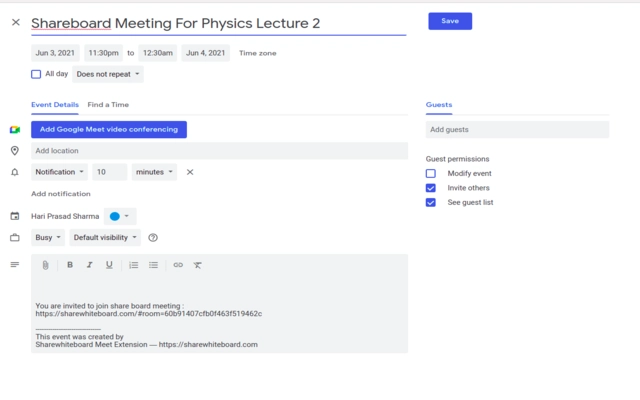
Share Whiteboard is a desktop software extension designed to enable real-time collaborative whiteboarding for educational institutions and software development teams. It serves as a digital workspace where users can brainstorm, plan meetings, and visualize workflows in a shared environment. The tool is particularly useful for universities, remote classrooms, and agile teams managing Jira tickets, offering a centralized platform for visual collaboration. Its integration with popular communication tools like Slack, Zoom, and Webex enhances workflow continuity, allowing teams to maintain momentum without switching between platforms. Users can pre-schedule sessions and send calendar invites, streamlining meeting coordination. The software supports international collaboration, making it ideal for global teams and distributed learning environments. While the developer is identified as Share Whiteboard Inc., no additional background details are available. The application is built to support dynamic content creation, including audio annotations, emoticons, and mathematical formulas, providing a rich interactive experience. It aims to reduce friction in virtual collaboration by combining visual tools with communication features in one interface.
Key Features & Capabilities
- Real-Time Collaboration – Multiple users can edit the same whiteboard simultaneously, enabling live brainstorming and joint problem-solving across different locations.
- Jira Integration – Teams can link whiteboard discussions directly to Jira tickets, improving traceability and workflow alignment during software development cycles.
- Platform Integrations – Seamless connectivity with Slack, Zoom, Webex, and calendar systems allows users to initiate sessions directly from their preferred tools.
- Visual Tools Library – Includes mobile icons, software logos, and schema development icons to accelerate diagram creation and reduce manual drawing time.
- Audio Annotations – Users can record voice notes directly on the board, adding context to visual elements without leaving the workspace.
- Emoticon Sharing – Real-time expression sharing enhances communication during collaborative sessions, fostering a more engaging atmosphere.
- Mathematical Formula Support – Built-in tools allow users to input and render complex equations, supporting academic and technical discussions.
- Inbuilt Calculator – Provides quick access to calculation functions within the board, minimizing the need for external tools.
These features collectively support structured planning in education and agile development. For example, a university professor can pre-plan a lecture with visual aids and send a calendar invite, while a software team can map out a sprint backlog on the board and link it to Jira. The integration with communication platforms ensures that participants can join from any environment without disruption.
User Interface, Workflow & Performance
The user interface is designed around a clean, intuitive canvas layout, prioritizing accessibility and ease of navigation. Core tools are grouped into clearly labeled panels, allowing users to quickly select drawing instruments, icons, or annotation features. Navigation is straightforward, with minimal clicks required to switch between tools or access shared boards. The workflow supports both structured planning and spontaneous collaboration, making it suitable for both scheduled lessons and impromptu team discussions. While the developer did not specify resource usage details, the application’s 15.3 MB size suggests a lightweight footprint, which typically correlates with efficient performance. Stability during extended sessions has not been publicly documented, but the absence of reported issues in available data implies consistent operation. Performance observations are based on general software behavior patterns. Users can expect responsive interaction under normal conditions, though actual behavior may vary depending on system configuration and network speed.
Compatibility & System Requirements
Share Whiteboard is available for both Windows and Mac operating systems, supporting a broad range of desktop environments. The current version is 1.2.0, with a file size of 15.3 MB, indicating a compact installation. The developer did not specify exact system requirements, including minimum CPU, RAM, or storage needs. Compatibility information was partially provided, and no additional platform limitations were mentioned. Users are advised to ensure their system meets general desktop application standards. The software does not appear to require elevated privileges or special configurations for installation. It is designed to function as a desktop extension, suggesting it integrates with existing browser or desktop environments. No specific hardware requirements were listed, so users should rely on standard system capabilities for optimal performance.
Pros and Cons
Pros
- Real-time collaboration across global teams and classrooms
- Seamless integration with Jira, Slack, Zoom, and Webex
- Rich library of visual tools for faster diagramming
- Support for audio annotations and emoticon sharing
- Mathematical formula input with built-in calculator
- Free to use with no cost barrier for adoption
- Calendar integration for pre-planned sessions
Cons
- Exact system requirements were not listed
- No public performance benchmarks or stability reports
- Limited developer background information available
- Integration depth with third-party platforms not specified
- No details on data encryption or privacy protocols
FAQ Section
Is Share Whiteboard compatible with Windows and Mac?
Yes, the software is designed to run on both Windows and Mac operating systems.
Can I use this software for free?
Yes, Share Whiteboard is available at no cost, making it accessible for educational institutions and teams with limited budgets.
Does it integrate with Zoom and Slack?
Yes, the software supports integration with Zoom, Slack, and other communication platforms for seamless session initiation.
Is there a desktop application or is it browser-based?
Share Whiteboard functions as a desktop application extension, designed to operate independently on Windows and Mac systems.
How often are updates released?
Updates are released periodically, with the latest version being 1.2.0 as of August 10, 2024. Specific update schedules are not publicly disclosed.
Final Thoughts + CTA
Share Whiteboard delivers a compelling solution for real-time collaboration in education and software development. Its integration with Jira, Slack, Zoom, and calendar systems streamlines workflows, while the inclusion of visual tools, audio annotations, and mathematical support enhances productivity. The free pricing model removes adoption barriers, making it ideal for universities, remote teams, and global organizations. Although detailed system requirements and performance data are not available, the lightweight size and multi-platform support suggest broad accessibility. The software fills a clear gap in digital collaboration by combining visual planning with communication tools in one interface. For teams seeking a secure, intuitive, and feature-rich whiteboard experience, Share Whiteboard stands out as a strong contender. Download Share Whiteboard now.







